Tutorial · June 10, 2021
The perfect Vercel + GitHub Actions deployment pipeline
Use GitHub Actions to automatically test your code against a live Vercel preview URL before deploying to production with this step-by-step workflow guide.
As a Laravel developer, I haven't had much of a need for a serverless platform like Vercel. Recently though, I've been working on an API that provides VS Code compatible syntax highlighting and Vercel was the perfect choice for hosting it: fast, secure, and reliable.
Standard Deploying
You can deploy your Vercel app in a couple different ways. One is to deploy from your local machine using the Vercel CLI, by just calling vercel --prod. This makes your app live on the internet in less than a minute, which is kind of insane.
The other option is to hook up your GitHub repo to Vercel and let Vercel deploy every time you push to main.
Both of these options are extremely quick, but make me nervous. I didn't have any confidence that I wasn't deploying a broken build.
Perfect Deploying
In my mind, the perfect strategy would:
- Run automatically, not be dependent on a human
- Run my test suite, only deploying if it passes
- Deploy a preview to Vercel
- Run the tests again, against the Vercel preview
- Deploy to production if the tests pass again.
This means that my tests would actually run against my API live on Vercel. It's wonderful to test everything, but it gives me so much more confidence to know that after everything is deployed, it's all still going to work.
It may seem silly, but there is a wide chasm between a local machine and a fully deployed API on Vercel. There is a lot that could go wrong!
The GitHub Actions Workflow
Since the code is all hosted on GitHub, GitHub Actions is the perfect way to implement this strategy. To get a GitHub Action up and running, you just need a .yml file in the ./github/workflows/ folder.
We'll call ours deploy.yml. We're going to walk through it step by step, but here is an overview of it first, with the steps collapsed:
./github/workflows/deploy.yml
name: Deploy Torchlight Engine
on: [ push, pull_request ]
jobs:
  vercel:
    runs-on: ubuntu-latest
    steps:
      - name: Checkout Code
        uses: actions/checkout@v2

      - name: Cache Dependencies
        uses: actions/cache@v1
        with:
          path: ~/.npm
          key: ${{ runner.os }}-node-${{ hashFiles('**/package-lock.json') }}
          restore-keys: ${{ runner.os }}-node-

      - name: Setup Node 14
        uses: actions/setup-node@v2
        with:
          node-version: '14'

      - name: Build
        run: |
          yarn install --frozen-lockfile
          npm run bundle

      - name: Run Tests Locally
        run: npm run test

      - name: Deploy to Staging
        id: deploy-vercel-staging
        uses: amondnet/vercel-action@v20
        with:
          vercel-token: ${{ secrets.VERCEL_TOKEN }}
          vercel-org-id: ${{ secrets.VERCEL_ORG_ID }}
          vercel-project-id: ${{ secrets.VERCEL_PROJECT_ID_TL_ENGINE }}
          scope: ${{ secrets.VERCEL_ORG_ID }}

      - name: Run Tests Against Vercel
        env:
          VERCEL_URL: ${{ steps.deploy-vercel-staging.outputs.preview-url }}
        run: npm run test

      - name: Deploy to Production
        uses: amondnet/vercel-action@v20
        id: deploy-vercel-production
        if: github.event_name == 'push' && github.ref == 'refs/heads/main'
        with:
          vercel-token: ${{ secrets.VERCEL_TOKEN }}
          vercel-org-id: ${{ secrets.VERCEL_ORG_ID }}
          vercel-project-id: ${{ secrets.VERCEL_PROJECT_ID_TL_ENGINE }}
          vercel-args: '--prod'
          scope: ${{ secrets.VERCEL_ORG_ID }}
The first part of the workflow defines a bit of meta for us:
- the name of the workflow
- when the action will run (push or pull request)
- the job definitions
In our case we have one job, named vercel and it runs on the latest Ubuntu.
./github/workflows/deploy.yml
name: Deploy Torchlight Engine
on: [ push, pull_request ]
jobs:
  vercel:
    runs-on: ubuntu-latest
Building the World
The first few steps set up our environment and get us ready to be able to do our work. We checkout the repo, restore NPM cache if we can, install Node.js, and then run our own npm run bundle script to get our application ready to be deployed.
(For more about the --frozen-lockfile bit, check out my other post on Reliably Building Assets.)
steps:
  - name: Checkout Code
    uses: actions/checkout@v2

  - name: Cache Dependencies
    uses: actions/cache@v1
    with:
      path: ~/.npm
      key: ${{ runner.os }}-node-${{ hashFiles('**/package-lock.json') }}
      restore-keys: ${{ runner.os }}-node-

  - name: Setup Node 14
    uses: actions/setup-node@v2
    with:
      node-version: '14'

  - name: Build
    run: |
      yarn install --frozen-lockfile
      npm run bundle

  - name: Run Tests Locally
    run: npm run test

  - name: Deploy to Staging
    id: deploy-vercel-staging
    uses: amondnet/vercel-action@v20
    with:
      vercel-token: ${{ secrets.VERCEL_TOKEN }}
      vercel-org-id: ${{ secrets.VERCEL_ORG_ID }}
      vercel-project-id: ${{ secrets.VERCEL_PROJECT_ID_TL_ENGINE }}
      scope: ${{ secrets.VERCEL_ORG_ID }}

  - name: Run Tests Against Vercel
    env:
      VERCEL_URL: ${{ steps.deploy-vercel-staging.outputs.preview-url }}
    run: npm run test

  - name: Deploy to Production
    uses: amondnet/vercel-action@v20
    id: deploy-vercel-production
    if: github.event_name == 'push' && github.ref == 'refs/heads/main'
    with:
      vercel-token: ${{ secrets.VERCEL_TOKEN }}
      vercel-org-id: ${{ secrets.VERCEL_ORG_ID }}
      vercel-project-id: ${{ secrets.VERCEL_PROJECT_ID_TL_ENGINE }}
      vercel-args: '--prod'
      scope: ${{ secrets.VERCEL_ORG_ID }}
Running the Tests
Before we deploy anything we want to run the tests locally. If the tests don't pass locally they definitely aren't going to pass on Vercel, so we can save ourselves some time. Vercel also has limits on concurrent builds, so it doesn't make sense to clog up the pipeline with builds that we know we are going to abandon.
steps:
  - name: Checkout Code
    uses: actions/checkout@v2

  - name: Cache Dependencies
    uses: actions/cache@v1
    with:
      path: ~/.npm
      key: ${{ runner.os }}-node-${{ hashFiles('**/package-lock.json') }}
      restore-keys: ${{ runner.os }}-node-

  - name: Setup Node 14
    uses: actions/setup-node@v2
    with:
      node-version: '14'

  - name: Build
    run: |
      yarn install --frozen-lockfile
      npm run bundle

  - name: Run Tests Locally
    run: npm run test

  - name: Deploy to Staging
    id: deploy-vercel-staging
    uses: amondnet/vercel-action@v20
    with:
      vercel-token: ${{ secrets.VERCEL_TOKEN }}
      vercel-org-id: ${{ secrets.VERCEL_ORG_ID }}
      vercel-project-id: ${{ secrets.VERCEL_PROJECT_ID_TL_ENGINE }}
      scope: ${{ secrets.VERCEL_ORG_ID }}

  - name: Run Tests Against Vercel
    env:
      VERCEL_URL: ${{ steps.deploy-vercel-staging.outputs.preview-url }}
    run: npm run test

  - name: Deploy to Production
    uses: amondnet/vercel-action@v20
    id: deploy-vercel-production
    if: github.event_name == 'push' && github.ref == 'refs/heads/main'
    with:
      vercel-token: ${{ secrets.VERCEL_TOKEN }}
      vercel-org-id: ${{ secrets.VERCEL_ORG_ID }}
      vercel-project-id: ${{ secrets.VERCEL_PROJECT_ID_TL_ENGINE }}
      vercel-args: '--prod'
      scope: ${{ secrets.VERCEL_ORG_ID }}
Deploying to Staging
If the local tests pass, then we want to go ahead and deploy a staging site to Vercel. We use a pre-built Vercel GitHub Action to help us out here, so that all we need to do is pass in some secrets.
Check out the GitHub docs for information on how to configure your repo secrets.
This action outputs a preview-url where your app can be reached on Vercel, which is what we're going run our tests against in the next step.
steps:
  - name: Checkout Code
    uses: actions/checkout@v2

  - name: Cache Dependencies
    uses: actions/cache@v1
    with:
      path: ~/.npm
      key: ${{ runner.os }}-node-${{ hashFiles('**/package-lock.json') }}
      restore-keys: ${{ runner.os }}-node-

  - name: Setup Node 14
    uses: actions/setup-node@v2
    with:
      node-version: '14'

  - name: Build
    run: |
      yarn install --frozen-lockfile
      npm run bundle

  - name: Run Tests Locally
    run: npm run test

  - name: Deploy to Staging
    id: deploy-vercel-staging
    uses: amondnet/vercel-action@v20
    with:
      vercel-token: ${{ secrets.VERCEL_TOKEN }}
      vercel-org-id: ${{ secrets.VERCEL_ORG_ID }}
      vercel-project-id: ${{ secrets.VERCEL_PROJECT_ID_TL_ENGINE }}
      scope: ${{ secrets.VERCEL_ORG_ID }}

  - name: Run Tests Against Vercel
    env:
      VERCEL_URL: ${{ steps.deploy-vercel-staging.outputs.preview-url }}
    run: npm run test

  - name: Deploy to Production
    uses: amondnet/vercel-action@v20
    id: deploy-vercel-production
    if: github.event_name == 'push' && github.ref == 'refs/heads/main'
    with:
      vercel-token: ${{ secrets.VERCEL_TOKEN }}
      vercel-org-id: ${{ secrets.VERCEL_ORG_ID }}
      vercel-project-id: ${{ secrets.VERCEL_PROJECT_ID_TL_ENGINE }}
      vercel-args: '--prod'
      scope: ${{ secrets.VERCEL_ORG_ID }}
Testing Against Staging
Now we're going to test against the fresh deploy we just made to Vercel. The first thing we do is define a new env variable called VERCEL_URL. The value of this URL come from the previous step (deploy-vercel-staging) and is one of the outputs listed in the docs of the Vercel Action.
steps:
  - name: Checkout Code
    uses: actions/checkout@v2

  - name: Cache Dependencies
    uses: actions/cache@v1
    with:
      path: ~/.npm
      key: ${{ runner.os }}-node-${{ hashFiles('**/package-lock.json') }}
      restore-keys: ${{ runner.os }}-node-

  - name: Setup Node 14
    uses: actions/setup-node@v2
    with:
      node-version: '14'

  - name: Build
    run: |
      yarn install --frozen-lockfile
      npm run bundle

  - name: Run Tests Locally
    run: npm run test

  - name: Deploy to Staging
    id: deploy-vercel-staging
    uses: amondnet/vercel-action@v20
    with:
      vercel-token: ${{ secrets.VERCEL_TOKEN }}
      vercel-org-id: ${{ secrets.VERCEL_ORG_ID }}
      vercel-project-id: ${{ secrets.VERCEL_PROJECT_ID_TL_ENGINE }}
      scope: ${{ secrets.VERCEL_ORG_ID }}

  - name: Run Tests Against Vercel
    env:
      VERCEL_URL: ${{ steps.deploy-vercel-staging.outputs.preview-url }}
    run: npm run test

  - name: Deploy to Production
    uses: amondnet/vercel-action@v20
    id: deploy-vercel-production
    if: github.event_name == 'push' && github.ref == 'refs/heads/main'
    with:
      vercel-token: ${{ secrets.VERCEL_TOKEN }}
      vercel-org-id: ${{ secrets.VERCEL_ORG_ID }}
      vercel-project-id: ${{ secrets.VERCEL_PROJECT_ID_TL_ENGINE }}
      vercel-args: '--prod'
      scope: ${{ secrets.VERCEL_ORG_ID }}
It will change based on the name of your app, but it will inject an environment variable similar to the following:
VERCEL_URL=https://your-app-git-refs-headsmain-hammerstone.vercel.app
With that env variable set, we can read it in our test runner just like every other env var, and switch the endpoint against which we're testing:
tests/runner.js
let remote = process.env.VERCEL_URL;

if (remote) {
    console.log(`Testing against remote url: ${remote}.`);
} else {
    console.log('Testing locally only.');
}

// Run your tests locally or aginst the preview URL.
With our test runner modified, we can simply run the exact same command to test against staging: npm run test
steps:
  - name: Checkout Code
    uses: actions/checkout@v2

  - name: Cache Dependencies
    uses: actions/cache@v1
    with:
      path: ~/.npm
      key: ${{ runner.os }}-node-${{ hashFiles('**/package-lock.json') }}
      restore-keys: ${{ runner.os }}-node-

  - name: Setup Node 14
    uses: actions/setup-node@v2
    with:
      node-version: '14'

  - name: Build
    run: |
      yarn install --frozen-lockfile
      npm run bundle

  - name: Run Tests Locally
    run: npm run test

  - name: Deploy to Staging
    id: deploy-vercel-staging
    uses: amondnet/vercel-action@v20
    with:
      vercel-token: ${{ secrets.VERCEL_TOKEN }}
      vercel-org-id: ${{ secrets.VERCEL_ORG_ID }}
      vercel-project-id: ${{ secrets.VERCEL_PROJECT_ID_TL_ENGINE }}
      scope: ${{ secrets.VERCEL_ORG_ID }}

  - name: Run Tests Against Vercel
    env:
      VERCEL_URL: ${{ steps.deploy-vercel-staging.outputs.preview-url }}
    run: npm run test

  - name: Deploy to Production
    uses: amondnet/vercel-action@v20
    id: deploy-vercel-production
    if: github.event_name == 'push' && github.ref == 'refs/heads/main'
    with:
      vercel-token: ${{ secrets.VERCEL_TOKEN }}
      vercel-org-id: ${{ secrets.VERCEL_ORG_ID }}
      vercel-project-id: ${{ secrets.VERCEL_PROJECT_ID_TL_ENGINE }}
      vercel-args: '--prod'
      scope: ${{ secrets.VERCEL_ORG_ID }}
If you check the logs of your GitHub Action, you'll see something similar to this:
Run npm run test

> @ test /home/runner/work/torchlight-engine/torchlight-engine
> node ./tests/run.js

************************
*     Running Tests    *
************************

Testing against remote url: https://torchlight-XXXX-hammerstone.vercel.app.

681ms	 [PASS] /tests/fixtures/summary-detail-with-class.txt
695ms	 [PASS] /tests/fixtures/yaml-with-config.txt
734ms	 [PASS] /tests/fixtures/focus-line-ranges.txt
755ms	 [PASS] /tests/fixtures/blade.txt
717ms	 [PASS] /tests/fixtures/min-dark-has-git-diff-colors.txt
770ms	 [PASS] /tests/fixtures/summary-detail.txt
708ms	 [PASS] /tests/fixtures/relative-double-range.txt
750ms	 [PASS] /tests/fixtures/focus-lines.txt
740ms	 [PASS] /tests/fixtures/relative-range-positive.txt
760ms	 [PASS] /tests/fixtures/relative-range-negative.txt
698ms	 [PASS] /tests/fixtures/no-lang.txt
755ms	 [PASS] /tests/fixtures/relative-double-range-2.txt
814ms	 [PASS] /tests/fixtures/moonlight-ii.txt
846ms	 [PASS] /tests/fixtures/yaml-ranges-were-out-of-order.txt
777ms	 [PASS] /tests/fixtures/solarized-light-has-line-number-colors.txt
842ms	 [PASS] /tests/fixtures/adds-classes.txt
940ms	 [PASS] /tests/fixtures/cpp-comment-is-removed.txt
         [..... Lots more tests]
Done.
We've now successfully run tests against the environment that we actually care about.
The last thing we have to do is deploy to production. Remember that the entire job will fail if one of the steps fail, so we don't have to check for that.
This is almost identical to the Deploy to Staging action, save for two things. The first is that we add an if condition into the step definition to only deploy to production if we're on the main branch. We'll run tests against staging on all branches, but we obviously only ever want to deploy to production for our main branch.
Make sure that you do not have the setting enabled in Vercel that auto-deploys your main branch. We will be manually deploying from this action!
The second thing we add is the vercel-args: '--prod', which is what tells Vercel to make this a production deployment.
steps:
  - name: Checkout Code
    uses: actions/checkout@v2

  - name: Cache Dependencies
    uses: actions/cache@v1
    with:
      path: ~/.npm
      key: ${{ runner.os }}-node-${{ hashFiles('**/package-lock.json') }}
      restore-keys: ${{ runner.os }}-node-

  - name: Setup Node 14
    uses: actions/setup-node@v2
    with:
      node-version: '14'

  - name: Build
    run: |
      yarn install --frozen-lockfile
      npm run bundle

  - name: Run Tests Locally
    run: npm run test

  - name: Deploy to Staging
    id: deploy-vercel-staging
    uses: amondnet/vercel-action@v20
    with:
      vercel-token: ${{ secrets.VERCEL_TOKEN }}
      vercel-org-id: ${{ secrets.VERCEL_ORG_ID }}
      vercel-project-id: ${{ secrets.VERCEL_PROJECT_ID_TL_ENGINE }}
      scope: ${{ secrets.VERCEL_ORG_ID }}

  - name: Run Tests Against Vercel
    env:
      VERCEL_URL: ${{ steps.deploy-vercel-staging.outputs.preview-url }}
    run: npm run test

  - name: Deploy to Production
    uses: amondnet/vercel-action@v20
    id: deploy-vercel-production
    if: github.event_name == 'push' && github.ref == 'refs/heads/main'
    with:
      vercel-token: ${{ secrets.VERCEL_TOKEN }}
      vercel-org-id: ${{ secrets.VERCEL_ORG_ID }}
      vercel-project-id: ${{ secrets.VERCEL_PROJECT_ID_TL_ENGINE }}
      vercel-args: '--prod'
      scope: ${{ secrets.VERCEL_ORG_ID }}
All Tests Pass
Now every time you push to main, you will see the following results if everything passes:
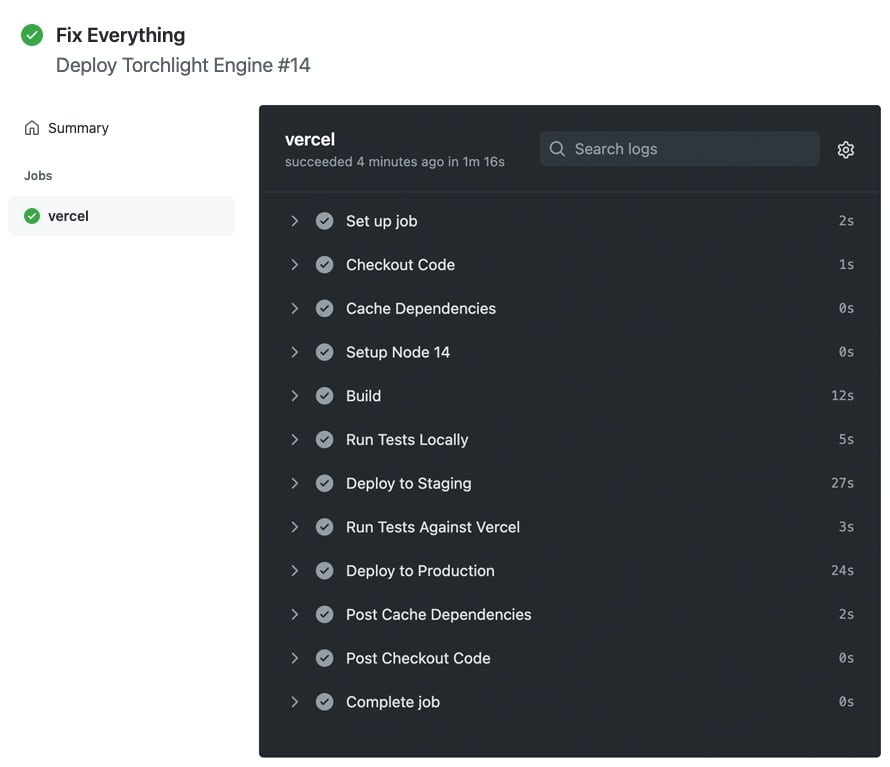
Go forth and merge with confidence!
Here is the entire, uncollapsed YAML file in case you want to copy paste it:
name: Deploy Torchlight Engine
on: [ push, pull_request ]
jobs:
  vercel:
    runs-on: ubuntu-latest
    steps:
      - name: Checkout Code
        uses: actions/checkout@v2

      - name: Cache Dependencies
        uses: actions/cache@v1
        with:
          path: ~/.npm
          key: ${{ runner.os }}-node-${{ hashFiles('**/package-lock.json') }}
          restore-keys: ${{ runner.os }}-node-

      - name: Setup Node 14
        uses: actions/setup-node@v2
        with:
          node-version: '14'

      - name: Build
        run: |
          yarn install --frozen-lockfile
          npm run bundle

      - name: Run Tests Locally
        run: npm run test

      - name: Deploy to Staging
        id: deploy-vercel-staging
        uses: amondnet/vercel-action@v20
        with:
          vercel-token: ${{ secrets.VERCEL_TOKEN }}
          vercel-org-id: ${{ secrets.VERCEL_ORG_ID }}
          vercel-project-id: ${{ secrets.VERCEL_PROJECT_ID_TL_ENGINE }}
          scope: ${{ secrets.VERCEL_ORG_ID }}

      - name: Run Tests Against Vercel
        env:
          VERCEL_URL: ${{ steps.deploy-vercel-staging.outputs.preview-url }}
        run: npm run test

      - name: Deploy to Production
        uses: amondnet/vercel-action@v20
        id: deploy-vercel-production
        if: github.event_name == 'push' && github.ref == 'refs/heads/main'
        with:
          vercel-token: ${{ secrets.VERCEL_TOKEN }}
          vercel-org-id: ${{ secrets.VERCEL_ORG_ID }}
          vercel-project-id: ${{ secrets.VERCEL_PROJECT_ID_TL_ENGINE }}
          vercel-args: '--prod'
          scope: ${{ secrets.VERCEL_ORG_ID }}
- Published
- June 10, 2021
- Reading
- 9 min
- Words
- 2,138
Set in Tiempos and IBM Plex Mono on a 22px baseline.
Thanks for spending a little of your day here.